
We all seek ways to simplify our daily tasks, and loading GSAT using GCash is one such convenience that can save you time and effort. GSAT is a popular PayTV service, and with the widespread use of mobile apps like GCash, loading your GSAT account has become quick and easy. In this article, we will guide you through the steps to load GSAT using GCash, making the process hassle-free and seamless.
GSAT and GCash
GSAT, or Global Satellite, is a direct-to-home satellite television service that’s got viewers raving. As the bee’s knees of entertainment, it offers an array of channels, from news to sports to your favorite TV shows, catering to all tastes and age groups.
On the other hand, GCash is a virtual wallet that lets you shop ’til you drop, send money, pay bills, and yes, even load your GSAT. It’s like having your wallet, only better, right there in the palm of your hand.
Step-by-Step Guide to Load GSAT Using GCash
Let’s dive into the step-by-step process of loading GSAT using GCash:
1. Open the GCash App
If you haven’t installed the GCash app on your mobile phone, head to the app store and download it. Once installed, open the app.
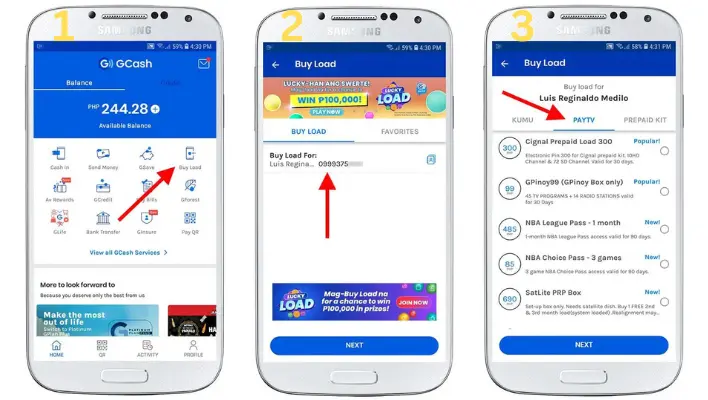
2. Tap “Buy Load”
Within the GCash app, look for the “Buy Load” option and tap on it. This will lead you to the loading page.
3. Enter the Mobile Number for GSAT PIN
Key in the mobile number where you want the GSAT PIN to be sent. Double-check the number for accuracy to avoid any issues.
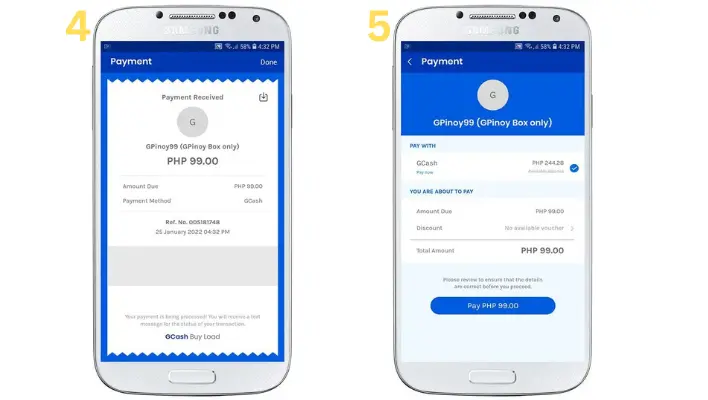
4. Choose the GSAT Load Denomination
Select the appropriate GSAT load denomination that suits your requirements. GCash usually provides multiple options, catering to various budget preferences.
5. Confirm the Transaction
Review the transaction details, including the amount and the mobile number. Once you are sure of the information, confirm the transaction.
6. Enter the GSAT PIN to Activate the Load
After completing the transaction, you will receive the GSAT PIN on the mobile number you provided. Enter this PIN on your GSAT account to activate the load.
Learn How to Load Gomo Sim using GCash, and how to Pay Shopee Pay Using Gcash?
Frequently Asked Questions
How do I know if my GSAT load was successful?
You’ll receive a confirmation message from GCash. If you’ve got that, then you’re good to go.
Is there a transaction fee for loading GSAT using GCash?
Yes, a minimal fee is charged. But hey, for the convenience it offers, it’s worth every penny.
What do I do if I encounter problems while loading GSAT using GCash?
Don’t be a stranger. Contact GCash or GSAT customer service. They’re there to help.
Can I load other cable services using GCash?
Of course! GCash supports a host of other cable services.
How secure is loading GSAT using GCash?
As secure as a lock and key. GCash employs state-of-the-art security measures to ensure your transactions are safe and sound.
Conclusion
In conclusion, loading GSAT using GCash is a quick, easy, and secure method to ensure uninterrupted entertainment on your PayTV service. By following the step-by-step guide provided in this article, you can effortlessly load your GSAT account without any hassle.
Related Articles:-
How to Convert Sodexo to GCash?